
Hoplites At Work: From Forgotten Tickets to Fixing Live Issues


Hoplites series · Part 2 of 3: How we use it
In the first part of this series we introduced Hoplites, our cloud-based agents. In this post we’ll dig into the workflows that have worked for us with Hoplites so far.
Hoplites is redefining whole workflows at Paxos, from proactive cleanups that used to sit in backlogs to cross-team collaboration between compliance, operations and engineering on our internal tooling, helping us serve our customers more effectively.
Forgotten Tickets to Merged Changes
Engineers were the first to adopt Hoplites. They did not shift their core workloads to Hoplites (although Hoplites launching before Claude and Codex Remote shipped did lead to some large features fully developed via Slack on mobile); they picked up the often ticketed and forgotten work. These are the non-critical but good practice hygiene tasks: cleaning up feature flags, removing dead configuration, updating codeowners, small refactors, minor bug fixes and updating our internal tooling.
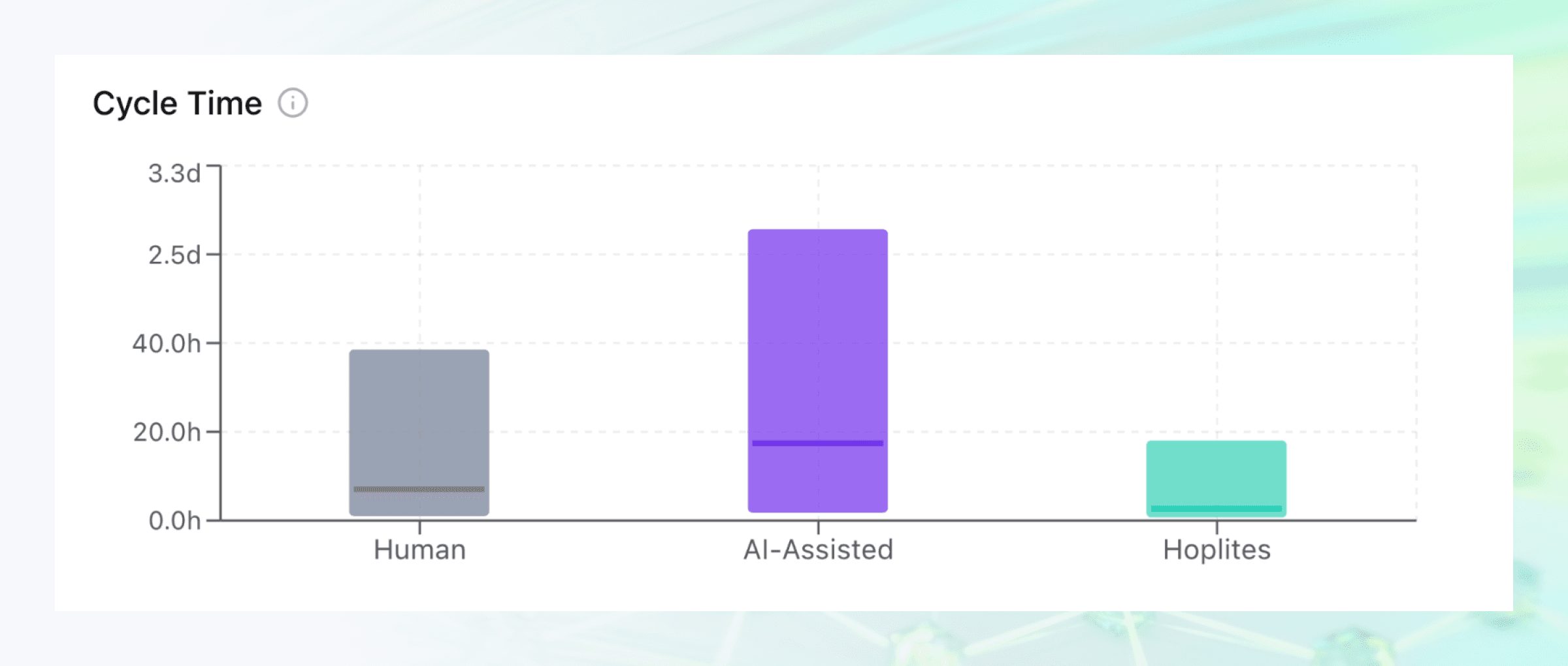
Cycle time for human, AI-assisted and Hoplites pull requests
Hoplites changed the effort from ticket → assign → spinup local agent → babysit pull request to a single @Hoplites message in Slack, a small but consequential effort reduction. Because the prompt and the agent live in Slack where reviewers can contribute to the conversation proactively - engineers quickly realised cycle times for changes raised by Hoplites are blazingly fast. As a result, we’re seeing a lot more simple change requests start and end with a Hoplites conversation, with only complex requests landing as tickets.
Open internal tooling to non-engineers
Earlier this year, Paxos’s growing volumes, products, and jurisdictions pushed us to step up our game around our internal tooling and dashboards. Those tools serve nearly all teams at Paxos, but particularly operations, compliance and engineering.
We made a bet against drag-and-drop low code solutions: in a world of AI, we could get the best of both non-engineering contributions to internal tools with the diligence, gates and control that direct code contributions give us. This is where we’ve seen Hoplites shine.
Hoplites allows you to specify dedicated agent profiles (essentially a hoplite with a dedicated system prompt), the default profile is used if unspecified, for our internal tooling we have a pax-admin profile with baked in the key knowledge of the repositories, backend/frontend stacks and common pitfalls when making pax-admin contributions. Here’s an example interaction:
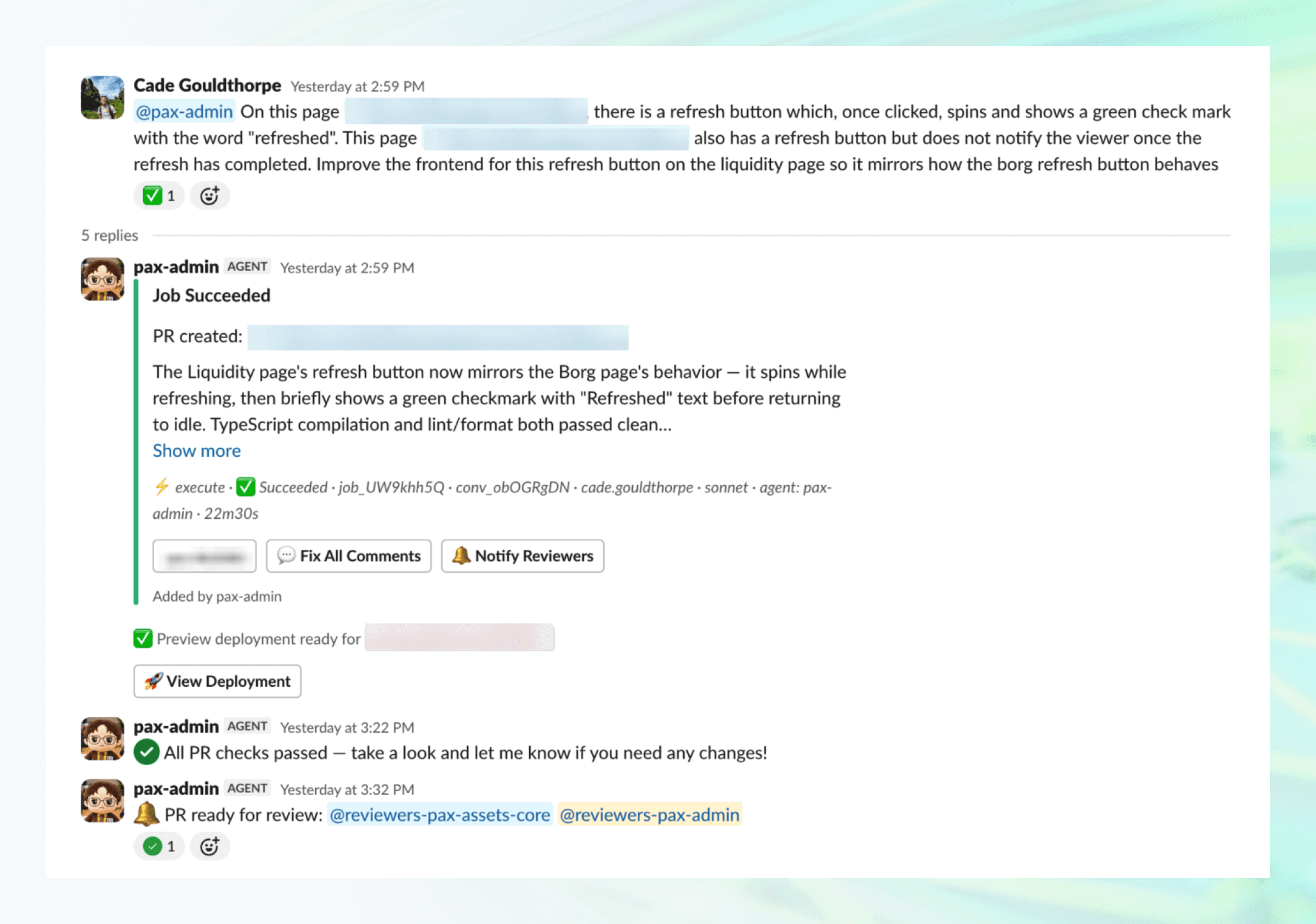
Member of operations fixing a small issue using the pax-admin hoplite
The multiplayer AI between engineers and the direct consumers of internal tools has led to a boom in internal tooling at Paxos, giving us greater insight into our products and better ways to serve our customers. All of it happens inside the same controls: pull requests raised by agents carry the same reviewer requirements (two human reviewers, at least one of them an engineer), continuous integration and security standards as engineer-authored code.
A few things we’ve learnt along the way
Having a dedicated Slack handle
@pax-adminworks far better than@Hoplites --agent pax-adminor relying on non-deterministic agentic routing.Around 50% of conversations with
@pax-adminstart from non-engineers, the people using the internal dashboard day-in day-out know best what needs fixing or changing.Owning our tooling has allowed rich in-Slack integrations, e.g. the ‘View Preview Deployment’ taking you to a live deployed preview of the app or ‘Notify Reviewers’ / ‘Fix All Comments’ functionality.
Becoming on-call’s right hand
Hoplites is not just a cloud based coding agent, we gave Hoplites access to datadog’s excellent pup CLI and built a dedicated @triage Hoplites agent - this has been awesome. Here it is in action:
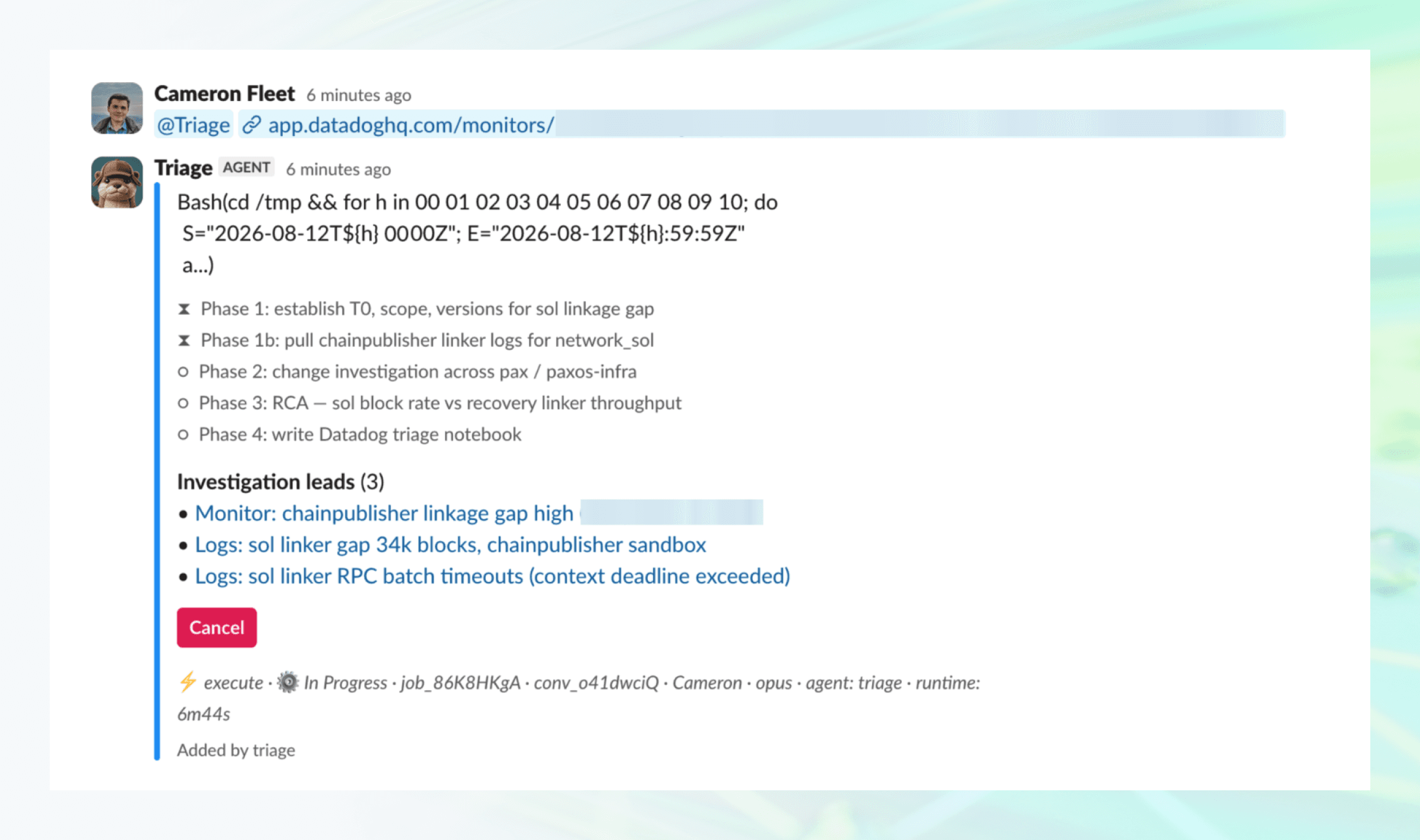
An inflight investigation from our triage hoplite
One pattern we noticed early on: during incidents, many responders would concurrently send off their own agents. That had a cost: tokens, yes, but more importantly the responders' attention. Everyone was babysitting a local chat instead of doing the things we expect humans to do: investigating dashboards, checking logs and actually thinking. Moving that context to Slack, behind a single agent triggered by a single @triage tag has kept the team focused, knowing an agent has eyes on the problem.
Waiting for a complete root cause analysis (RCA) from an agent can take some time. We built Investigation Leads which proactively raises key monitors, logs, suspicious code paths and pull requests in real-time, letting responders click in and connect the dots before the RCA is complete. The triage hoplite then outputs the finished RCA as a Datadog Notebook, with full reasoning and useful widgets:
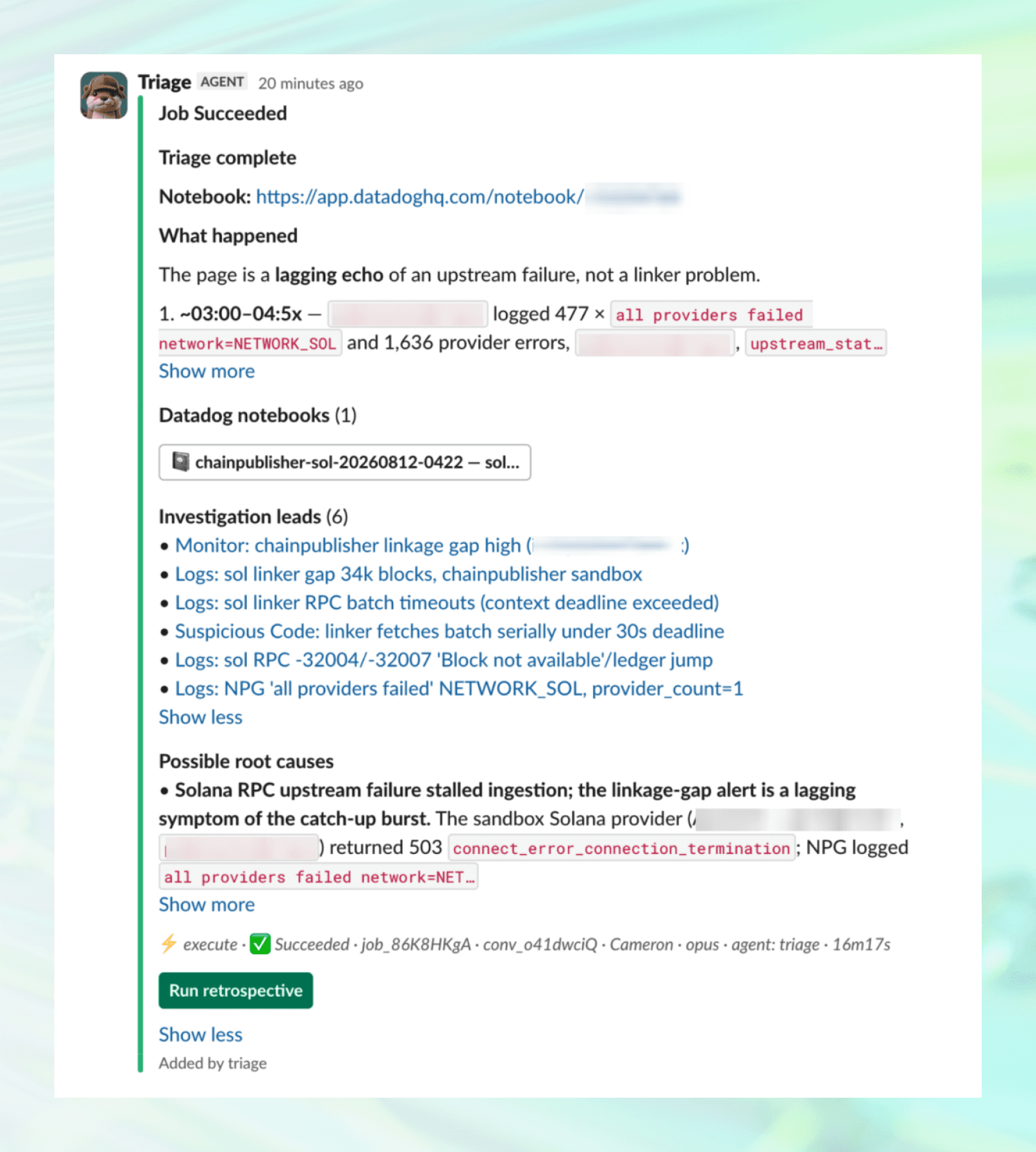
Response from the triage Hoplite once an RCA is complete
Triage tasks make up around 30% of all Hoplites agents spawned, and we’ve embedded the whole incident response lifecycle in one agent, we’ve given it the ability to:
Judge incident severity according to our severity incident matrix
Create incident retrospective documents (with a dedicated ‘Run Retrospective’ when an RCA is complete or a simple
@triage retro please)Automatically pull in full channel context when running in an
#incident-*Slack channel
This has become a crucial tool for our on-call engineers, with some teams even auto-invoking @triage on any page that comes in. Outside engineering, operations uses it heavily to understand and investigate various issues before coming to engineering. The result: less manual effort in incident response and faster resolution for our customers.
Keeping our systems, data and agents safe
The wave of LLMs has increased the stakes in keeping our systems secure, and introduced new attack vectors;Hoplites being both a new attack vector at Paxos and increasingly being used as a tool to make sure we stay one step ahead.
Hoplites executes conversations on remote compute with full network and filesystem sandboxing in place, granting the minimum set of privileges required for specific tools (e.g., Github, Datadog). To protect our environment and ensure strict regulatory compliance, we maintain rigid boundaries and controls across all agent workflows:
Strict Review & CI Gates: Agent-generated pull requests adhere to the same reviewer, continuous integration, and security requirements as engineer-authored code, with no exceptions.
Walled-off Data & Secrets: Agents are explicitly barred from accessing secrets, customer data, and PII, ensuring zero read or write access to sensitive information.
Full Auditability: Every conversation, interaction, and executor log is stored and auditable via our web interface, providing full traceability for who prompted the agent, what code changed, and what the agent executed.
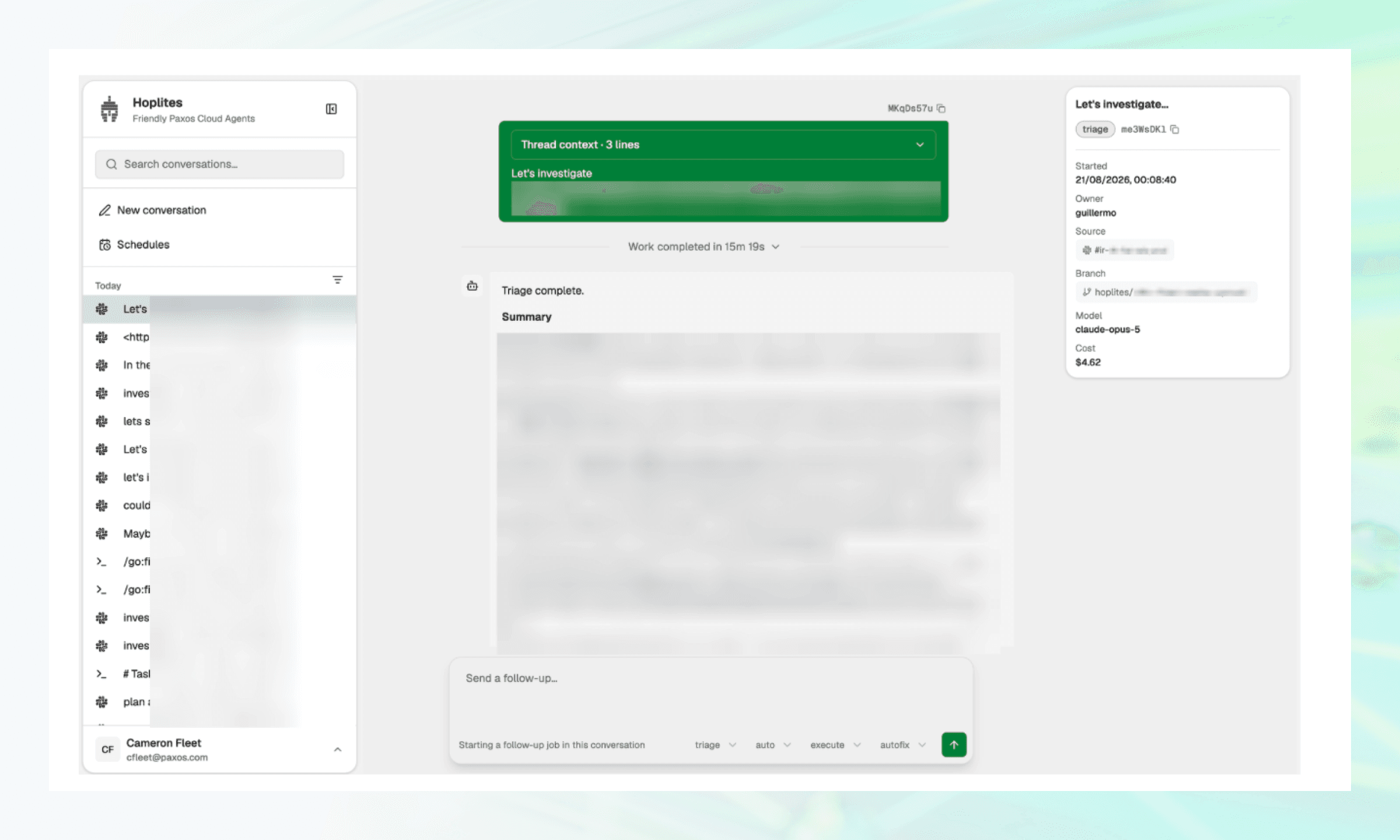
Hoplites webapp showing full audit trail visibility into conversations
Next up
Every workflow above starts the same way: a teammate describes what they need in Slack, a Hoplite agent does the work, and a human reviews what ships. In the final post of this series, we'll cover what has changed at Paxos: the impact on our backlog and cycle times, the architecture under the hood, and where we're taking Hoplites next.
If you like these kinds of problems, you might like working with us: Paxos Careers.

